Skip to content
e-Gridium
Menu

Partners · Onboarding and sandbox

Onboarding passes two gates: technical and financial

The technical gate closes per partner; the financial gate once for the whole hub. The two proceed independently: a technically connected partner sees its statements before the financial gate closes. This page covers both gates, the handshake, prerequisites per role and the sandbox.

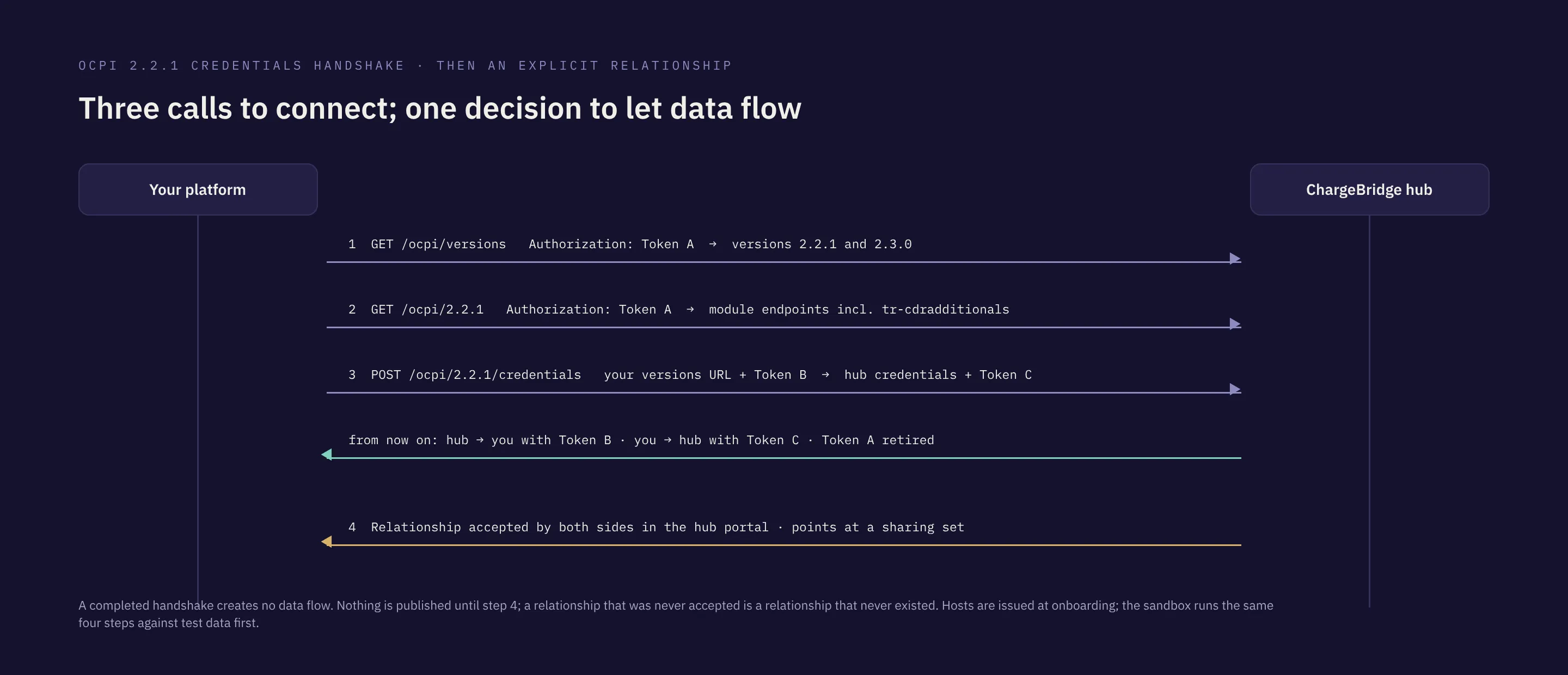
OCPI credentials handshake: versions with Token A, version details, the Token B and C exchange, then the relationship accepted by both sides.
The handshake is four steps and establishes identity; data flow starts only when the relationship is accepted by both sides.

Two gates

The technical gate opens data, the financial gate opens money

01 · Technical gate

Closes per partner

Handshake, data flow and dry-run statements

Once the agreement and DPA are signed, the credentials handshake is completed in the sandbox first, then relationships are accepted explicitly. Locations, tariffs, sessions and CDRs flow; every settlement window closes with a netting statement. At this stage statements are dry-run: amounts are visible, no invoice is issued.

What closes it

  • Signed participation agreement and DPA
  • An OCPI versions endpoint reachable from the hub and a Token A
  • Your role’s sender and receiver modules exercised in the sandbox
  • The first relationship accepted by both sides

What it opens

  • The handshake and your party in the hub directory
  • Data flow along accepted relationships
  • A dry-run netting statement for every window
1/4 Present in source code
Inspect evidence

Fail-closed partner relationships· Source code review

No location, tariff, session, CDR or token flows unless an explicitly accepted, active partner relationship exists between the two parties; publish scope defaults to deny and changes are written to an audit ledger.

Supports:That a completed credentials handshake does not open data flow and that scope is an explicit, auditable decision.

Does not show:Contractual data-sharing permissions; those come from the signed agreement and DPA.

Source: ChargeBridge hub source repository (private), reviewed on the date given · Verified4 October 2026

All evidence records →

02 · Financial gate

Closes once for the hub

Real money

The financial gate is the moment netting statements turn into payment obligations and invoices. It closes once for the hub as a whole and three conditions have to be met first. No closing date is published on this site; connected partners are informed directly.

What closes it

  • A data processing agreement signed with every connected partner
  • Regulatory registrations completed
  • The e-invoice rail in operation

What it opens

  • Payment obligations from statements
  • Invoices and e-invoicing
  • Money moving through the rail chosen in the agreement
1/4 Present in source code
Inspect evidence

Settlement window state machine· Source code review

The clearing platform moves each settlement window through OPEN, GRACE_PERIOD, RECONCILING and CLOSED; late CDRs enter during the grace period and disputes surface before close.

Supports:That settlement periods, netting statements and payment obligations are produced by the platform.

Does not show:That money has moved between partners through the hub: settlement runs in dry-run until the financial go-live gate closes, and invoicing is fenced until then.

Source: ChargeBridge hub source repository (private), reviewed on the date given · Verified4 October 2026

All evidence records →

Handshake

Four calls, then one decision

The OCPI 2.2.1 credentials handshake as the hub runs it. Hosts are placeholders; the hub endpoint is issued at onboarding. Three steps are protocol, the fourth is the explicit decision in the portal.

  1. 01

    Discover versions

    GET /ocpi/versions · Authorization: Token <TOKEN_A>

    With the Token A issued at onboarding you read which OCPI versions the hub offers (2.2.1 and 2.3.0) and the version-details URL of each.

  2. 02

    Read module endpoints

    GET /ocpi/2.2.1 · Authorization: Token <TOKEN_A>

    The version details list every module endpoint with its role; tr-cdradditionals appears here for Türkiye partners.

  3. 03

    Exchange credentials

    POST /ocpi/2.2.1/credentials · body: your credentials + TOKEN_B

    You send your versions URL and Token B; the hub answers with its credentials and Token C. From here the hub calls you with Token B and you call the hub with Token C. Token A is retired.

  4. 04

    Accept relationships

    hub portal · partner relationship · both sides accept

    A completed handshake creates no data flow. Each partner relationship is accepted explicitly by both parties and points at a sharing set; only then do locations, tariffs, sessions and CDRs move.

Technical prerequisites

The interfaces the hub expects on the partner side

What every partner needs, module interfaces per role and network behaviour. Module names are the identifiers in the OCPI version-details catalogue.

01 · Every partner

  • Versions endpoint (GET /ocpi/versions) and version details (GET /ocpi/2.2.1 or /ocpi/2.3.0)
  • Credentials module, sender and receiver interfaces
  • HTTPS with TLS 1.2 or newer; endpoints reachable from the hub without allow-listing

02 · CPO

ModuleInterface
locationsSender
tariffsSender
sessionsSender
cdrsSender
tokensReceiver
commandsReceiver
tr-cdradditionalsSender (Türkiye)

03 · eMSP

ModuleInterface
locationsReceiver
tariffsReceiver
sessionsReceiver
cdrsReceiver
tokensSender + real-time authorize
commandsSender

04 · Network behaviour

  • Responses within 10 seconds (connection timeout)
  • Idempotent handling of retried pushes
  • A sandbox round before production: handshake, then each module against the charger simulator

What you need

Requirements per role, with their gate

Each item says which gate it belongs to. The list does not replace the participation agreement; missing items are listed together during the sandbox stage.

CPO

6 items

For charge point operators

  • Technical gate

    Signed roaming participation agreement and data processing agreement

  • Technical gate

    Legal name, tax number and, where applicable, charging network operator licence number

  • Technical gate

    An OCPI versions endpoint reachable from the hub and a Token A for the handshake

  • Technical gate

    Sender implementations for locations, tariffs, sessions and CDRs; receiver for tokens and commands

  • Financial gate

    tr-cdr-additionals populated on every CDR

  • Financial gate

    Collection and invoicing details as set out in the agreement

For CPOs →

eMSP

6 items

For e-mobility service providers

  • Technical gate

    Signed roaming participation agreement and data processing agreement

  • Technical gate

    Legal name and tax number

  • Technical gate

    An OCPI versions endpoint reachable from the hub and a Token A for the handshake

  • Technical gate

    Receiver implementations for locations, tariffs, sessions and CDRs; sender for tokens and commands

  • Technical gate

    Real-time authorize endpoint for tokens

  • Financial gate

    Collection and invoicing details as set out in the agreement

For eMSPs →

NSP

2 items

For navigation and data providers

  • Technical gate

    Signed participation agreement for the data-consumer role

  • Technical gate

    A receiver-only OCPI endpoint for locations and tariffs

For NSPs →

NSP · data consumer

For navigation and data providers

Receive locations, status and tariffs that CPOs choose to publish to you; no sessions, CDRs or settlement, because you neither operate chargers nor sell to drivers.

Modules you use

credentialslocationstariffshubclientinfo

Navigation or data provider (NSP) · Apply to connect

Partners in this role ask for

  • Show accurate charger availability in a map or vehicle product
  • Receive one feed instead of scraping or integrating networks one by one
  • Respect each CPO’s publishing decision

How it proceeds

  1. 01

    Application

    You apply as a data consumer; the agreement covers use of the data you receive.

  2. 02

    Handshake

    Inbound registration against your receiver endpoint.

  3. 03

    Publish decisions

    Each CPO decides whether and what to publish to you; the default is nothing.

Receiver only

The NSP role has no sender modules. Sessions, CDRs, tokens and commands never reach a data consumer, and the settlement platform does not know the role exists.

Data use

What you may do with the feed is set in the agreement, not in the protocol. The hub enforces scope; you enforce use.

What you see in the hub portal

  • ▸My contract and relationships
  • ▸My records: locations received
  • ▸Data quality

Test environment

Partner sandbox

Sandbox routes in the OCPI adapter and a mock partner and charger simulator let a partner complete the handshake and exercise each module against test data before onboarding.

Supports

That a test environment is part of onboarding.

Does not show

Self-service sign-up; sandbox credentials are issued after the application is reviewed.

1/4 Present in source code
Inspect evidence

Partner sandbox· Source code review

Sandbox routes in the OCPI adapter and a mock partner and charger simulator let a partner complete the handshake and exercise each module against test data before onboarding.

Supports:That a test environment is part of onboarding.

Does not show:Self-service sign-up; sandbox credentials are issued after the application is reviewed.

Source: ChargeBridge hub source repository (private), reviewed on the date given · Verified4 October 2026

All evidence records →

What follows

What happens after you apply

  1. 01

    Apply with your role and versions endpoint

    Your application is answered from a work e-mail; your role and versions endpoint are checked.

  2. 02

    Sign the participation agreement and DPA

    The agreement and DPA templates are shared; after signature your party is created in the hub directory and sandbox credentials are issued.

  3. 03

    Handshake in the sandbox, then accept relationships

    Handshake and module checks are completed in the sandbox; the first relationships are accepted and data flows.

How it proceeds

  1. 01Apply with your role and versions endpoint
  2. 02Sign the participation agreement and DPA
  3. 03Handshake in the sandbox, then accept relationships

Connect your network or app once; decide the rest per partner.